
Digital wellbeing for Android
Your screen-time companion.
A magical pet that lives on top of your apps, looks after your attention and reminds you that life also happens off the screen.
Android 8.0+v1.2.216.3 MBFree

“Breathe. I’ll handle the noise.”
Gentle limits, not cold screens
Instead of locking you out with generic warnings, DarmixPet puts a companion on top of your apps that keeps you company and tells you when to stop.
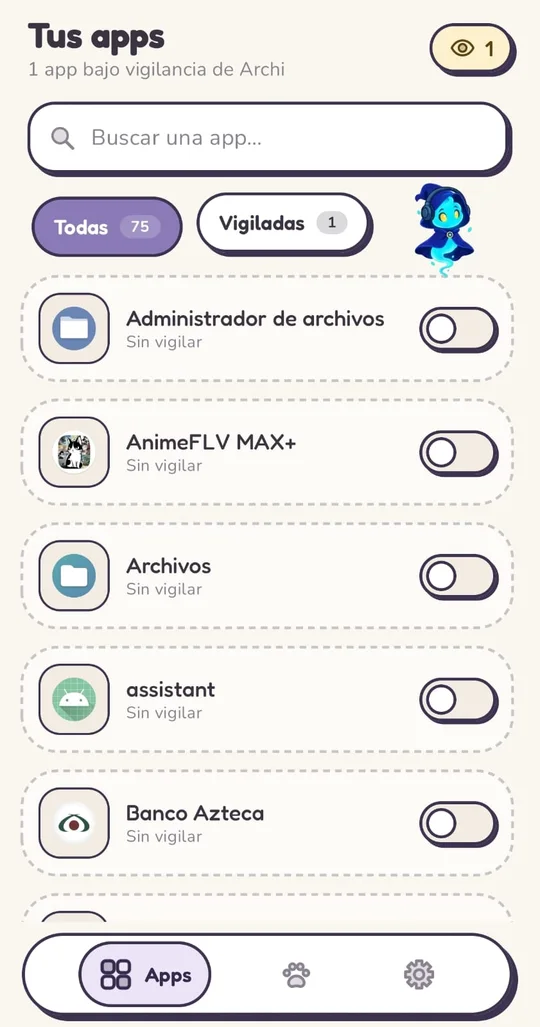
Choose what to watch
Search your apps and watch only the ones that steal the most time.
Set your limits
How long each session lasts, how long the break between sessions is and how many sessions you get per day.
Your companion looks after you
When time runs out, it takes you home with a kind message and starts the cooldown.
- 30 min per session
- 60 min cooldown
- 3 sessions a day
Everything it does for you
Designed to keep you company without getting in the way.
Smart watching
Session time, cooldown and daily sessions per app, with a live counter and a daily reset.
Floating pet
Three characters with animated sprites, their own phrases and reactions to your taps. Drag it out of the way.
Quick menu
Long-press your pet: brightness, volume, timer and character switch without leaving what you’re doing.
Contextual alerts
It reacts when your battery is low, when it’s getting late or when you’re listening to music.
Sticker-style design
Thick outlines, solid shadows and rounded corners. Each character changes the app’s style.
Light, dark or system theme
It adapts to your taste and remembers your choice.
See it in action
This is how it looks on a real phone.
Choose your companion
Three souls, three ways to look after you. Pick one and the app changes style with you.
Archi the Archmage
Ether · Arcane magic
“Breathe. I’ll handle the noise.”

Sylva the Sage
Nature · Vitality
“All good things grow slowly.”

Sir Galahad the Guardian
Earth · Discipline
“Your time is your treasure. I defend it.”
Install it in a minute
DarmixPet downloads straight from its official GitHub repository.
- 1
Download the APK
Tap “Download APK” on your Android phone.
- 2
Open it
From the download notification or your file manager.
- 3
Allow the install
If Android asks, allow installing apps from this source.
- 4
Grant the permissions
The app guides you step by step; below we explain what each one is for.
- 5
Pick your companion
And start looking after your time.
Android 8.0+v1.2.216.3 MBFree
Permissions, no fine print
DarmixPet needs a few permissions to work. Here’s what it does with each one.
Allow restricted settingsOnly on Android 13 or later. It’s a first step that unlocks the other permissions for apps installed outside the store.
How to turn it on
- DarmixPet’s “App info” screen opens.
- Tap the ⋮ menu and choose “Allow restricted settings”.
- Confirm with your fingerprint, PIN or pattern and go back to the app.
Don’t see the option? Try enabling “Usage access” first; Android shows it after that warning.
Display over other appsSo your pet can float on top of your other apps.
How to turn it on
- Turn on “Allow display over other apps”.
- Go back with the Back button.
Usage accessTo measure how long you spend in each app and apply your limits.
How to turn it on
- Find DarmixPet in the list and tap it.
- Turn on “Permit usage access” and go back.
NotificationsTo let you know when an app goes on a break and keep your pet alive in the background.
How to turn it on
- Tap “Allow” in Android’s dialog.
- If you declined before, turn them on from the app settings.
No battery optimizationSo power saving doesn’t close your pet.
How to turn it on
- Choose “Unrestricted” (or “Don’t optimize”).
On Xiaomi, Huawei and other brands, also turn on “Autostart”.
Instant detection (Accessibility)To know instantly which app you opened and block it in time. It only detects which app is open: it doesn’t read messages, keyboards or passwords.
How to turn it on
- In Accessibility, open “Downloaded apps” and tap DarmixPet.
- Turn on “Use DarmixPet” and accept Android’s warning.
Modify system settingsOnly to change brightness from your pet’s quick menu.
How to turn it on
- Turn on “Allow modifying system settings”.
Works 100% on your phone
Your screen time is yours. No one else sees it.
What it doesn’t do
- No user accounts
- No ads
- No tracking or telemetry
- No servers of its own
What it does
- Everything is processed on your phone
- It only contacts GitHub to tell you about new versions
- Uninstalling it deletes all your data
Frequently asked questions
Is it free?
Yes. It’s free, with no ads or in-app purchases.
Is installing an APK safe?
Yes, as long as it comes from the official source. The button on this page downloads the file straight from the releases of DarmixPet’s GitHub repository.
How do I know about a new version?
The app tells you when there’s an update. Install it over the previous one: you keep your watched apps and settings.
Does it work on iPhone?
No. DarmixPet is Android only (8.0 or later).
Why do I see the “displaying over other apps” notice?
Android shows it for any app that floats over the others. You can hide it from its settings, but don’t turn off the “DarmixPet active” notification: it keeps your pet alive.
I found a bug or have an idea. Where do I share it?
Open an issue on GitHub with your phone model, Android version and DarmixPet version (Settings → About).